Updates
Since the launch on September 29th 2026, the developers continue to improve the game and add further functionality. These changes are released as updates. Every major update is announced at transportfever3.com as well as on Steam.
Release Notes
If you are interested in what the exact changes are that come along with the updates, have a look at the release notes.
Get the latest Update
The latest build is automatically downloaded by the Steam client, Epic Games launcher or GOG Galaxy client. GOG users not using GOG Galaxy can download the latest build in the GOG games library.
On consoles, the update is also automatically rolled out and installed at the next possible occasion.
To verify that you are using the latest build, compare the build number displayed in the bottom right corner of the main menu with the latest build number in the release notes.
Preview Version
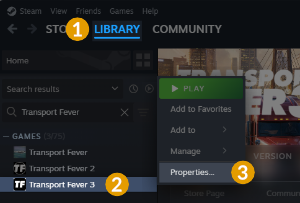
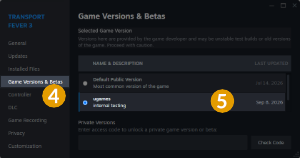
Before a game update, the oncoming changes are often available as a preview version on Steam to be tested by the users.
Steam
If you want to try out new features and help us testing the stability of new versions, upcoming patches can be accessed in advance by using the Steam branch preview.
To switch the branch, close the game and open your Steam game Library 1. Right click Transport Fever 3 2 in the game list and selected Properties… 3. Under the Game Versions & Betas 4 section you can select preview from the list 5. This can be reverted anytime.
The preview version is equal or newer than the current release version on the main Steam branch.
Please note that the testing version might not be stable, so you should always save your game under a new name when using it. Games saved in a newer testing version may not be loadable in an older release. It is possible that some mods get broken due to updates. Please be patient, in most cases it is possible to sort the issues out sooner or later.