Table of Contents
Railroad Crossings
Railroad Crossings are defined in .rcr.lua configuration files. They use models that can have certain animation events.
Configuration
The configuration file of a railroad crossing has several properties:
function data()
return {
  description = {
    name = _("Half-barrier crossing"),
    icon = "era_b_eu.tga",
  },
  availability = {
    yearFrom = 1925,
    yearTo = 1975,
  },
  menuCategory = {
    categories = {
      {
        filterCategories = {"special"},
        order = 5000,
      },
    },
  },

  categoryList = {
    categories = {
      "temperate.clima", "subarctic.clima"
    },
  },

  cost = 16000,
  soundFileName = "railroad_crossing.wav",
  crossingMaterial = "street/railroad_crossing.mtl",
  trafficDelay = 3500,

  config = {
    {
      modelLeft = "railroad/crossing/eu_a_simple.mdl",
      modelRight = "railroad/crossing/eu_b_barrier_small.mdl",
      streetWidth = 12.0
    },
  },
}
end
The properties in detail:
descriptioncontains two properties:nameis the name of the railroad crossing type. It can be translated in a strings.json file.descriptionis the description tooltip. It can be translated in a strings.json file.iconis a reference to a small@2x.tgaicon which has a resolution of 120×76 pixels shown in the menu when railroad crossing types can be selected.
availabilitycontainsyearFromis the year from when the railroad crossing should be available. Unset or values below 1901 mean from start.yearTois the year until when the railroad crossing should be available. Unset or value 0 means unlimited availability, values below 1900 result in a never available railroad crossing.
menuCategoryis used to define the filter categories and order. See the construction menu for more details about them.categoryList.categoriesis a list of tags that are used in the terrain generation process and climate filtering. Entries that equal the filename of a climate are used to assign the model to a certain climate. It will not be available in other climates.costis the cost for a railroad crossing.soundFileNameis a reference to a sound effect file that is played while the railroad crossing is closing or closed.crossingMaterialis a material reference for the shape that lays between the two rails of the track. If unset,infrastructure/railroad_crossing/shared/mat/railroad_crossing.mtlis used as fallback.trafficDelayis the time in milliseconds between the begin of the open animation and the point where the road traffic starts to move again. If unset, the delay is 2500 ms.
The config list contains one or more configuration structs. Each of the configuration structs has three properties:
modelLeftis the model that is used at the left side of the street in direction towards the crossing.modelRightis the model that is used at the right side of the street in direction towards the crossing.streetWidthis the street width for which the configuration is suited best.
If there is more than one configuration available, the one that matches the actual street width best is chosen.
Events
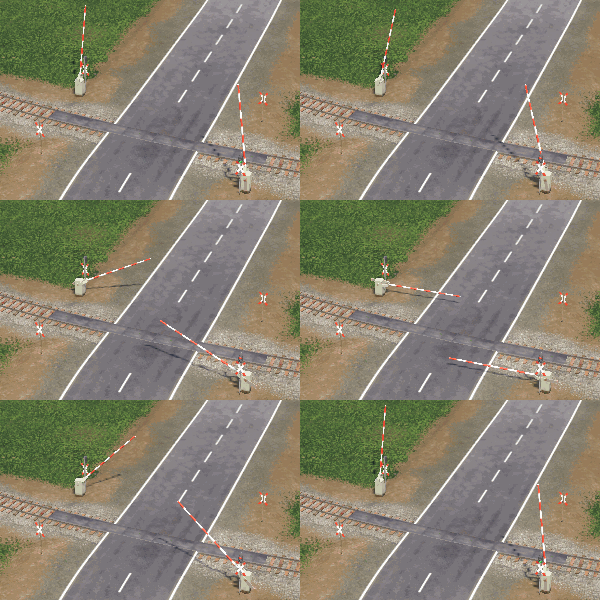
railroad crossing animations
Railroad crossings support some animation events that are triggered depending on their state. They can be used in mesh nodes of their models to support the visualisation of the two states 'open' and 'closed':
foreveranimation is used for any permanently looped animation.idle_openanimation is used as a loop while the railroad crossing is in 'open' state.closeanimation is used when the railroad crossing switches from 'open' to 'close'.idle_closedanimation is used as a loop while the railroad crossing is in 'closed' state.openanimation is used when the railroad crossing switches from 'closed' to 'open'.
While the forever animation runs constantly, the other four events form a loop.
Usually a railroad crossing is in 'open' state and the idle_open animation is performed. As soon as a train is approaching the close animation is performed once. Then idle_closed is looped as long as the railroad crossing stays closed. When the train is through and the railroad crossing turns back to open, open is performed once before idle_open is looped again.
The idle animations can be used e.g. for blinking lights.